
AI Document Processing
From raw document to decision-ready data — no manual entry, no waiting. With the company that has led this field in Syria and the region for more than twenty years.
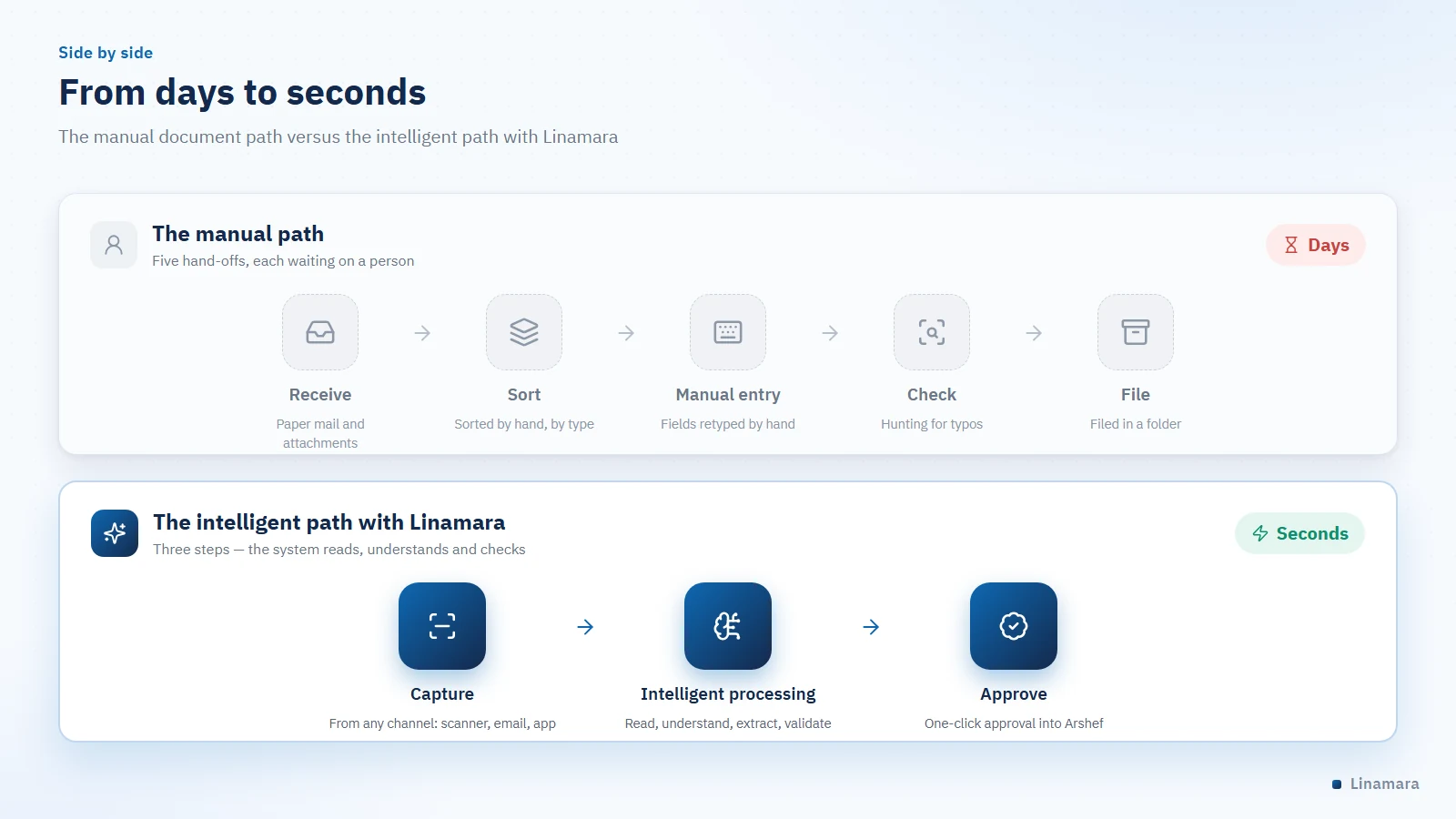
Every organization has information locked inside its documents: figures in invoices, clauses in contracts, dates in case files. At Linamara we release that information and turn it into structured data that flows automatically into your systems — in seconds instead of days, and with an accuracy manual entry cannot match.

Contact Us Now
Contact us now if you have any inquiries or wish to learn more about our integrated services and solutions.
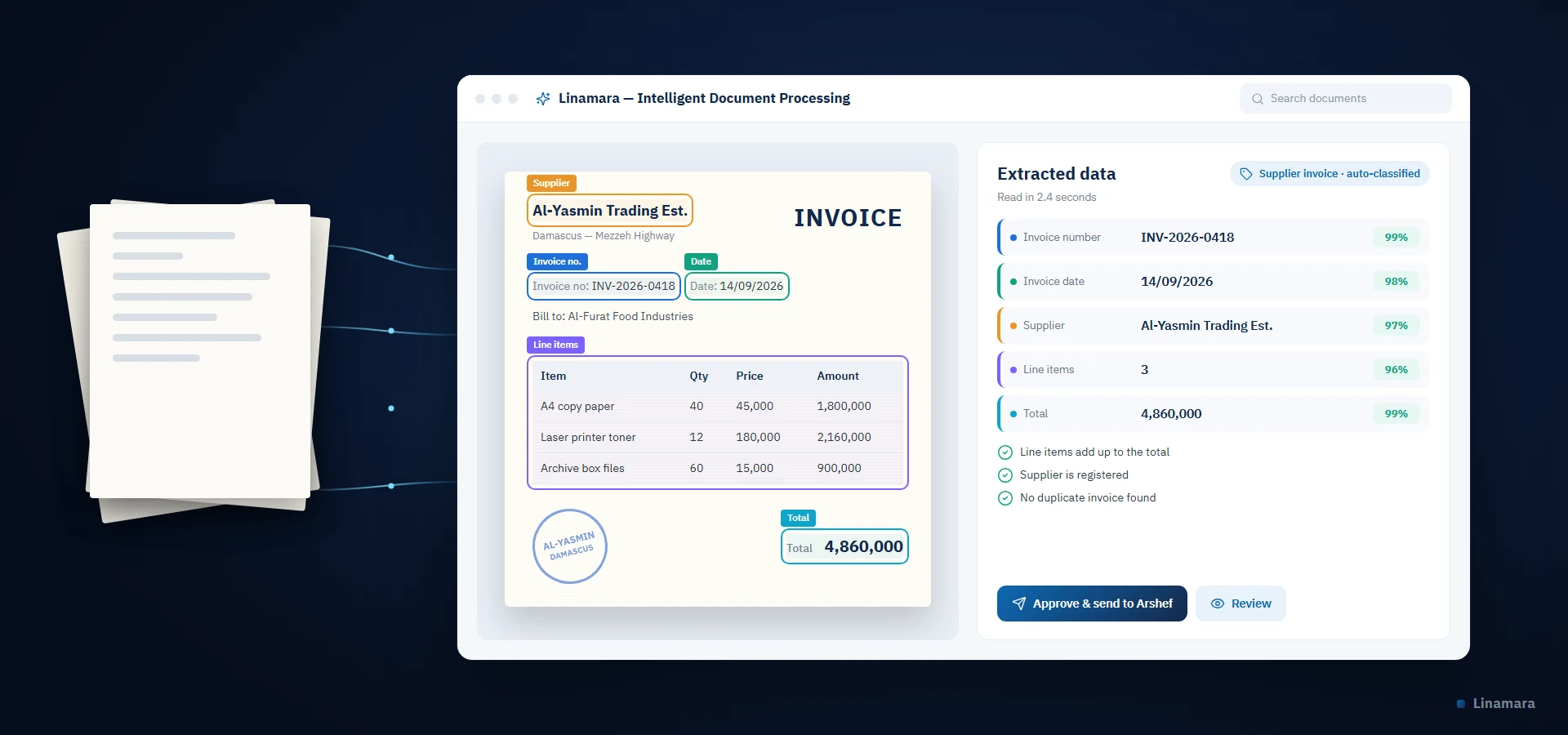
What is intelligent document processing?
❝ Short definition — a passage written to be quoted by answer engines Intelligent Document Processing (IDP) is a system that reads a document, understands its structure and content, extracts its data, classifies it and routes it to the right place in the organization automatically. It combines optical character recognition (OCR), computer vision, large language models and machine learning to handle a document the way an experienced employee would: read it, understand it, and act on it. |
The difference from traditional OCR is that OCR stops at turning an image into text, while intelligent processing goes on to understanding: it knows this document is an invoice and not a contract, and that this number is the total and not the tax ID — and then makes a decision based on what it understood.
Why Linamara is the first choice
Linamara has been at the forefront of document management and electronic archiving in Syria and the Middle East since 2002. More than twenty years of continuous field work, a strong track record of major projects delivered for government bodies and leading companies, and a broad client base that renews its trust in us year after year.
This leadership is not a marketing claim but the result of unmatched experience: we know what a real invoice looks like in the local market, how an official letter is written in a government office, and where machine reading stumbles over Arabic script — because we have faced it in the field for more than two decades, while others were still reading about it in brochures.
- The most established in the field: continuous experience since 2002 in electronic archiving and document management.
- The most complete offering: no one else in the market delivers the whole system from a single source — professional scanners, archive cabinets, the Arshef software, the administrative communications system, and the AI layer on top of them all.
- The most capable in Arabic: models built around the characteristics of Arabic and local administrative patterns, not imported solutions hastily localized.
- The most trusted by government: major government bodies have chosen us as their partner for sensitive projects.
- The closest to you: a specialist team in Damascus serving clients in their language and time zone, with direct support and no intermediaries.
The challenge: where your organization bleeds time and money
- Hours spent retyping what is already written — work that adds no value and drains salaries and time.
- Small errors, big costs: a transposed digit or a wrong due date means a double payment or a late penalty.
- Slow document cycles: a transaction waiting in an inbox becomes a bottleneck that stalls a whole chain of decisions.
- No management visibility: data locked in paper never reaches a report and never supports a decision.
- Fragile compliance: proving a procedure to a regulator turns into an exhausting search with no guaranteed result.
- Dependence on people, not systems: knowing where documents are stays in one employee’s head — and leaves with them.
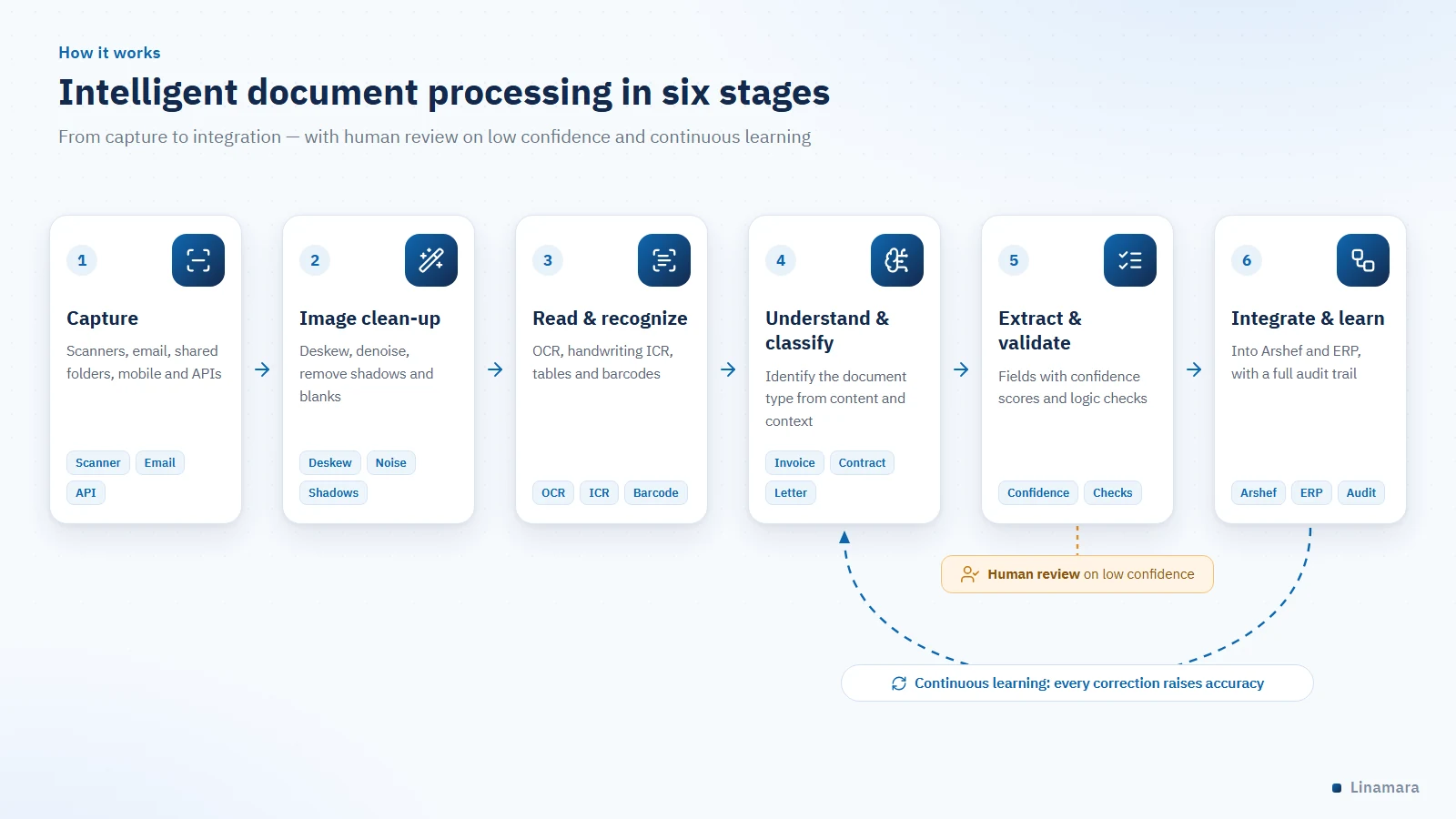
How it works: six stages
| Stage | What happens |
|---|---|
| 1. Capture | Documents are received from every channel in your organization: scanners, email and attachments, shared folders, the mobile app, web forms and APIs — so no document stays outside the digital path. |
| 2. Image enhancement | Deskewing; removing noise, specks and shadows; adjusting contrast; deleting blank pages; correcting orientation and removing border lines. This stage alone raises extraction accuracy noticeably. |
| 3. Reading & recognition | Turning the image into text with optical character recognition for print (OCR) and intelligent character recognition for handwriting (ICR), and reading marks, barcodes, stamps, signatures and tables with their full structure. |
| 4. Understanding & classification | Identifying the document type — invoice, contract or official letter — by understanding content and context rather than matching rigid templates, so the system classifies a document it has never seen and determines its path and fields. |
| 5. Extraction & validation | Extracting the required fields, then subjecting them to logical checks: do the line items add up to the total? Is the supplier registered? Is the invoice a duplicate? Every value carries a confidence score, and anything below the threshold goes to human review. |
| 6. Integration & learning | Delivering the data to the archiving, ERP or accounting system with a full audit trail. Every human correction feeds back into the model — so accuracy rises automatically with every cycle. |
Core capabilities
| Capability | What it means in your daily work |
|---|---|
| Multilingual reading | Arabic and English in the same document, including diacritics, cursive script, and Hindi and Arabic numerals together. |
| Template-free extraction | No template per supplier or form: the system infers where a field is from context and handles a new document it has never seen. |
| Table understanding | Extracting tables with their full structure of rows and columns, including tables that span several pages. |
| A confidence score for every field | Every value carries a confidence score, and you set the threshold below which a document goes to human review. |
| High-volume processing | Thousands of pages per batch, with load balancing and resume after interruption. |
| Duplicate and tamper detection | Instant alerts when a duplicate document arrives or when signs of alteration are detected on its image. |
| Full audit trail | Every operation documented — who, when and what changed — to meet audit and regulatory requirements. |
Arabic: where our expertise makes the difference
Most global engines were built on Latin-script documents, with Arabic support added later, so their performance drops on Arabic documents. We treat Arabic as the project’s first language and tackle its structural challenges directly:
- Connected letters that change shape with their position in the word — we use models trained on whole words and lines, not single characters.
- Multiple official scripts, from Naskh to Ruq’ah to Diwani, in stamps and letterheads.
- Arabic handwriting in filled-in forms, margin notes and endorsements on official letters.
- Mixed direction and numerals: Arabic text interspersed with Latin terms, and Hindi and Arabic numerals in the same document.
- Diacritics and hamza forms: a normalization layer that handles the variant spellings of hamza, alif maqsura and ta marbuta.
- Hijri and Gregorian calendars: reading dates in both formats and unifying them in the system.
Integration and security
- Native integration with Arshef, Linamara’s electronic archiving software, and with the administrative communications system and professional scanners.
- Open connectivity with ERP and accounting systems and databases through REST APIs, webhooks and structured export in JSON, XML and Excel.
- On-premise operation: the option to deploy the entire system on your own servers so no document ever leaves your network — our recommendation for government bodies.
- End-to-end encryption of data in transit and at rest, with fine-grained permissions by document type, field and department.
- Automatic masking of sensitive data (national ID and bank account numbers) according to user permissions.
- A tamper-proof audit trail and controlled retention and disposal policies for every document class.
Running it inside your organization on Think AI hardware
When the decision is that documents stay inside the building, we deliver the complete system together with the hardware that runs it: liquid-cooled Think AI nodes, pre-installed with the ILM platform to run reading, understanding and extraction models with no external connection. They work in an ordinary office or server room — no data center and no special cooling infrastructure.
Scale of use | Suggested node | Why |
A single department or pilot project | MicroNode | A quiet desk-side node with two accelerators and 192 GB of memory — a fast start with no server room |
Production processing across departments | SuperNode | Four accelerators and 384 GB of unified memory — replaces three to four conventional servers |
High volumes with continuous training | UltraNode | Seven accelerators that train reading models on your documents while serving users |
Data centers and large institutions | RackNode | Eight accelerators in a rackmount chassis with the highest cooling density in the family |
The final choice of node comes after reviewing your document volumes and number of users, in a free sizing session.
Use cases by sector
Sector | Use case | Impact |
Government | Automating incoming and outgoing letters, extracting their data and routing them automatically | Shorter transaction times and real-time tracking |
Banking & finance | Account-opening files, KYC documents and credit facility paperwork | Faster approvals and stronger compliance readiness |
Manufacturing | Extracting supplier invoices and matching them to purchase orders and receipts | A closed purchase cycle and fewer double payments |
Insurance | Reading claims and their medical and supporting documents | Faster claim decisions |
Healthcare | Digitizing medical files and reports and linking them to the patient record | Instant retrieval of medical history |
Higher education | Admission applications, certificates and transcripts, and their equivalence | Admission seasons completed with fewer errors |
Logistics | Bills of lading, certificates of origin and customs declarations | Shorter clearance times and fewer penalties |
Impact on performance indicators
Indicator | Before | After |
Processing time per document | Minutes to hours | Seconds |
Data entry accuracy | Varies with focus and pressure | High, consistent and measured |
Straight-through processing rate | Zero | Rises steadily with learning |
Retrieval time for an archived document | Minutes to days | Instant |
Cost per page | Tied to working hours | Falls as volume grows |
Audit readiness | Manual search, no guarantee | A complete, instant record |
Start with the leader in the field
Send us a sample of your documents and we will show you the results of intelligent processing on your own data, not on ready-made samples. Our professional team is ready to support you and answer all your questions quickly and efficiently.
▶ Request a free consultation | Book a live demo
Do you have any inquiries?
Contact us now if you have any questions or wish to learn more about our integrated services and solutions. Our professional team is ready to provide support and answer all your inquiries with speed and efficiency, ensuring you receive the best possible experience and service.
Frequently asked questions
Q1. What is the difference between OCR and intelligent document processing?
OCR only turns an image into text, giving you searchable words without understanding their meaning. Intelligent processing builds layers of understanding, classification, extraction, validation and decision-making on top of that. In short: OCR reads; intelligent processing reads, understands and acts.
Q2. Does the system handle handwritten Arabic documents?
Yes, through intelligent character recognition (ICR) trained on Arabic handwriting — an area where Linamara has built more experience than anyone else in the local market. Anything above the approved confidence threshold passes automatically; anything below goes to a quick review that shows the field next to its original image.
Q3. Do we need a template for every document type or supplier?
No. The system relies on understanding-based extraction rather than rigid templates: it infers where a field is from context and handles an invoice from a supplier it has never seen. We still recommend an initial tuning phase on your most frequent documents to maximize accuracy from day one.
Q4. Where are our documents stored? Do they leave our servers?
That is your decision. We offer full on-premise operation, in which documents and processing stay inside your network with nothing leaving it — our recommendation for government bodies and sectors subject to data-sovereignty restrictions. Cloud and hybrid deployments are also available.
Q5. Why choose Linamara specifically?
Because we are the most established and experienced company in this field locally and regionally: continuous experience since 2002, a strong track record of major projects for government bodies and leading companies, and an integrated system from a single source that no one else offers — from scanners and archive cabinets to Arshef and the AI layer — with a local team that supports you directly, without intermediaries.
Q6. Which hardware do we need to run intelligent processing in-house?
It depends on your daily document volume and number of departments. For a single department or a pilot, a Think AI MicroNode running under a desk is enough; for production processing across the organization we recommend a SuperNode. We finalize the choice with you in a sizing session, and you can expand later without re-architecting.